Kinematics simulator: how accurately does a five-bar linkage draw?
PlotBot moves its pen with a five-bar linkage. Two motors each turn a 65 mm upper arm, and their shafts sit 36 mm apart. A 90 mm forearm hangs off each upper arm, and the two forearms meet at the pen. The firmware works out both motor angles from the pen position it wants.
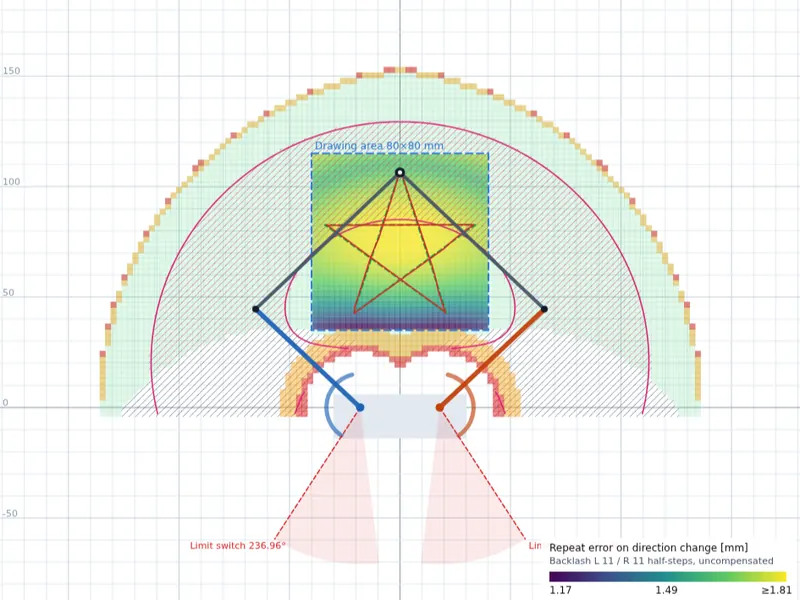
The simulator shows that calculation from above. Drag the pen with your mouse or finger and watch the arms follow. Colours show which points the pen can reach, where the linkage gets close to a straight line, and how far the pen jumps when a motor takes one step.
You can change the arm lengths, shaft distance, drawing area and motor, and let the robot trace test figures. That shows why the drawing area is 80 × 80 mm and why it sits where it does.
What the colours mean
- Green
- The pen can reach these points without the linkage flipping over.
- Orange and red
- Critical zones: a joint is almost straight or the forearms are almost parallel. There, a tiny motor error turns into a large pen error.
- Heatmap
- From dark purple (accurate) to yellow (less accurate): how far off the pen lands when gear backlash kicks in on a change of direction. It can also show the pen travel per motor step or per degree.
- Pink hatching
- Here the forearms meet at the pen at roughly a right angle (70–110°). That's the best place for the drawing area.
- Grey hatching
- Blocked: the upper arms would cross, or an arm would run past its limit switch.
The simulator needs JavaScript. It's built for a large screen; on a phone the controls sit below the drawing.
- Upper arm left
- Upper arm right
- Forearms
- Drawing area
- reachable
- Joint angle < 20°
- < 10° (singular)
- Forearms ≈ 90°
- ×real pen on the step grid
- blocked (soft limit)
- Limit switch